Problem
The script tag with type “text/babel” will always load in a list of other script tags with type “text/javascript” even if it is written before all the other tags.
Imagine there is a HTML file and some JS files lurking in a hypothetical project somewhere in this universe.
The HTML file looks something like this.
<html>
  <head></head>
  <body>
    <!-- Imagine some content here -->

    <script src="./src/foo.js" type="text/javascript"></script>
    <script src="./src/bar.js" type="text/javascript"></script>
    <script src="./src/baz.js" type="text/javascript"></script>
  </body>
</html>
The universe wants to use some new shiny ECMAscript features (which is probably not yet supported in some browsers) in foo.js which means you will now need to compile that file using Babel. But your hypothetical project has some drawbacks, that is, you can’t compile the JS file server-side, leaving you with only one other option: compiling in the browser.
Well, no big deal, you just need to import the babel minified js file and change the script tag that sourced foo.js to have type text/babel.
<html>
  <head></head>
  <body>
    <!-- Imagine some content here -->

    <script src="https://unpkg.com/@babel/standalone/babel.min.js"></script>
    <script src="./src/foo-babel.js" type="text/babel"></script>
    <script src="./src/bar.js" type="text/javascript"></script>
    <script src="./src/baz.js" type="text/javascript"></script>
  </body>
</html>
But then you try to load the HTML and the console just screams at you: foo is undefined bar.js:1. Apparently, the first line of bar.js is something like this:
var fooResult = foo.doSomething();And apparently that foo being referenced there is undefined.
Now, I was in this situation and the first thing that I thought was:
“What the heck? foo is loaded before bar. It’s written a line before bar. How is it not defined?!”
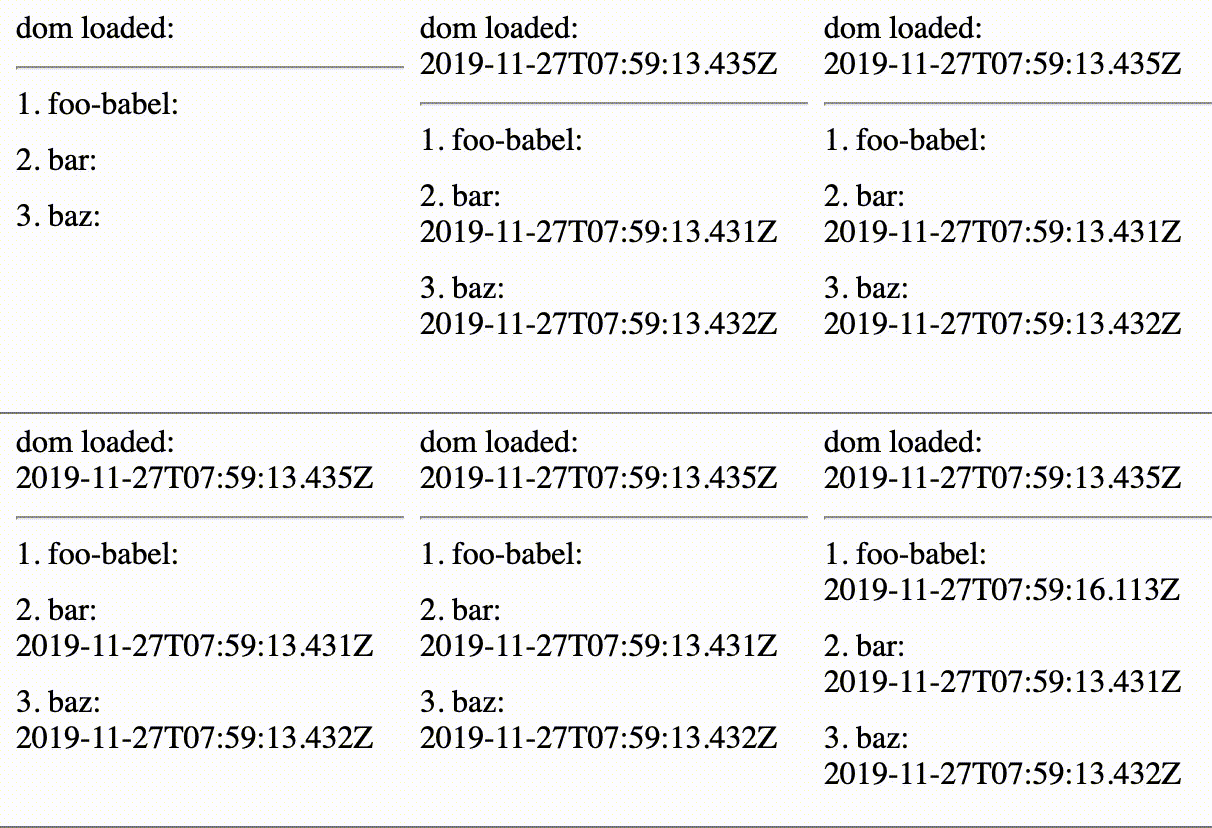
I dug through the Network tab on my browser and found out that foo-babel.js was loaded after both bar.js and baz.js. I think I was losing my mind at that point like hallucinating.
A fact check:
Script tags load synchonously unless you use the
deferorasyncattribute.
Google said, “That’s true”.

After some time of mucking around and intensed refreshing of the HTML, I accepted the fact that foo-babel.js will always load last.
But why?
As it turns out, if you look into the non-minified @babel/standalone/babel.js file (as of version 7.7.4), you will find some line codes of that look like that.
function onDOMContentLoaded() {
  transformScriptTags();
}

if (typeof window !== "undefined" && window && window.addEventListener) {
  window.addEventListener("DOMContentLoaded", onDOMContentLoaded, false);
}

function transformScriptTags(scriptTags) {
  runScripts(transform, scriptTags);
}
I saw those 6 lines (well, 9) and well, everything makes sense now.
Babel waits until after the DOM content is loaded (read: after all the other script tags have been parsed) then transforms the script tag with “text/babel” type.
Here is an illustration indicating what time foo-babel.js, bar.js and baz.js are executed and when the DOMContentLoaded (more about this event on MDN) event happens if you are more of a picture person.
Wait for it…
Conclusion
I ended up solving my problem by saying “No, universe, let’s not use shiny new ECMAscript features in foo-babel.js. Let’s not go there if our project couldn’t support server-side compile and all the JS files keep reference each other.”